
A modern virtual agent is not a chatbot bolted onto ITSM. It is a service front door that lets people describe intent in plain language and still reach a structured outcome.
The trap is designing it as a feature bundle. That is how teams end up with brittle topics, long menus, and link dumping. The better model is capability. What does the agent enable for users, and what must be true behind the scenes for it to be safe, reliable, and scalable?
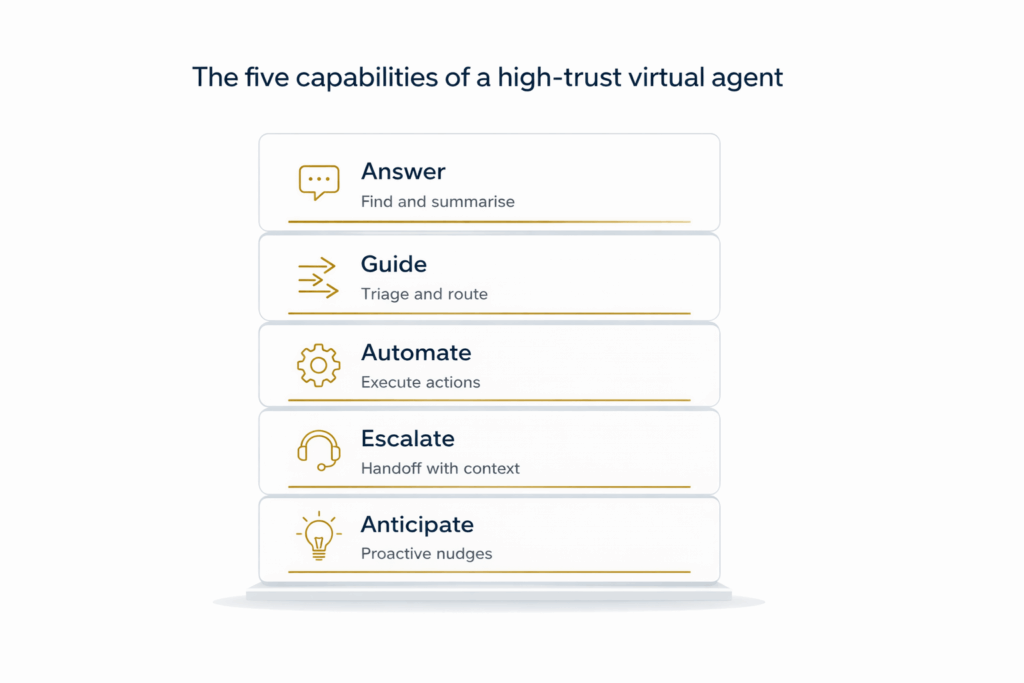
This post breaks a modern virtual agent into five capabilities. Answer, Guide, Automate, Escalate, and Anticipate. Together they form a trust architecture, the layers that turn chat into a dependable service channel.
One term worth defining is Core Journey. A Core Journey is a high volume service interaction that is designed end to end to feel effortless, from intent to outcome, including off ramps when automation should stop.
The five capabilities of a modern virtual agent
1. Answer
Answer is the ability to return fast, trustworthy responses grounded in approved knowledge and official communications.
User value
People want momentum. Answer reduces searching and avoids unnecessary tickets by putting the right information in front of the user in plain language.
Examples
• Search approved knowledge wherever it lives, including the IT knowledge base plus SharePoint and Confluence pages
• Search back with a short summary of the relevant steps, with a link to the source article instead of forcing the user to read the whole page
• Answer outage questions by surfacing the current major incident or service status update, with the official message and a link back to the source
The foundation
• Knowledge ownership and freshness, so answers do not conflict
• The agent only answers from content the user is allowed to see
• Clear fallback behaviour when the answer is unclear, including a safe next step rather than guessing
A useful technical distinction sits underneath this capability. Semantic search helps find the right documents. Grounded generation reads those documents to produce a short, verifiable summary. Executives do not need the terminology, but they will feel the difference immediately. One experience returns links. The other returns an answer you can trust.
2. Guide
Guide is the ability to triage complexity and steer the user to the right path, even when they do not know the service name, the right form, or the internal terminology.
User value
Guide removes the cognitive load. It turns vague complaints into a specific path and narrows the problem enough that the platform can act, or a human can pick up without rework.
Examples
• Catalogue guidance and genius results, such as I need a new laptop, followed by a few clarifying questions and a confident recommendation
• Dynamic triage, asking only what matters for a VPN drop, then guiding to the most likely fix or the right next step
• Lightweight structured capture that pre fills what it can and keeps the conversation short
• Intercept incidents that arrive via email and pull the user into a faster chat based path when the issue is known and solvable
The foundation
• A clean service catalogue with clear naming and minimal overlap
• Short, human flows that do not turn into a menu of options
• A clear first set of intents, chosen by volume and friction
3. Automate
Automate is the ability to trigger approved workflows and integrations directly from the conversation with the right controls and audit.
User value
Automation turns intent into outcomes while the user stays in flow and reduces back and forth for service teams by standardising capture and execution.
Examples
• Resolve common issues directly in the conversation, such as password resets, account unlocks, MFA re enrolment, and access changes
• Trigger actions through integrations, such as software installs, identity changes, or collaboration provisioning
• Launch a governed request or form when needed, pre filled with context, so the user does not start from scratch
• Push approvals into chat experiences like Teams and Slack, so approvers can decide quickly with the right context
The foundation
• Least privilege access, approvals, and audit trails
• Reliable error handling and safe fallbacks when automation fails
• Workflow ownership and change control
• Guardrails on what can be automated and what must stay human approved
4. Escalate
Escalate is the ability to bring in humans smoothly without losing context when the agent should not complete the job.
Escalate is the safety net. A modern agent earns trust by knowing when to stop and handing off cleanly.
User value
Escalation protects trust. Users accept that some issues need a person. They do not accept repeating themselves or being bounced between queues.
Examples
• Live agent handoff that transfers the conversation, captured fields, relevant user and device context where appropriate, and what has already been tried
• Route escalations to the right queue and urgency, for example VIP support, major incidents, HR or security sensitive topics, and anything the agent is not confident about
• Set clear expectations when escalating, what happens next, who owns it, and when the user should expect an update
Escalation is not a failure state. It is a designed capability. The agent acts as a translator, turning messy intent into a clean summary and a clean handoff.
The foundation
• Clear ownership of queues and the full handoff experience, so work does not stall after transfer
• A clear handoff contract, so every escalation includes intent, key facts, what was tried, and next steps
• Privacy and consent controls for sensitive or regulated conversations
5. Anticipate
Anticipate is the ability to reduce friction before the user asks through proactive messaging and context aware guidance.
User value
When done well, anticipation prevents avoidable interrupts and reduces repeat questions. When done badly, it becomes noise.
Examples
• Proactive incident communications to affected users with consistent approved updates
• Lifecycle nudges such as password expiry reminders, access renewals, and onboarding prompts
• Context aware responses that lead with the most relevant update when the user asks a related question
The foundation
• Preference management, opt in, and controls for noise
• Context and relevance controls, so the agent only interrupts when it is timely, targeted, and worth it
• Measurement that proves value, fewer repeat contacts and faster time to outcome, not just bot usage
Build in layers, not all at once
You do not need all five capabilities on day one. Trying to build Anticipate before mastering Answer is a recipe for noisy failure.
A healthy virtual agent matures in stages. You earn the right to automate by first proving you can guide.
Capability maturity ladder
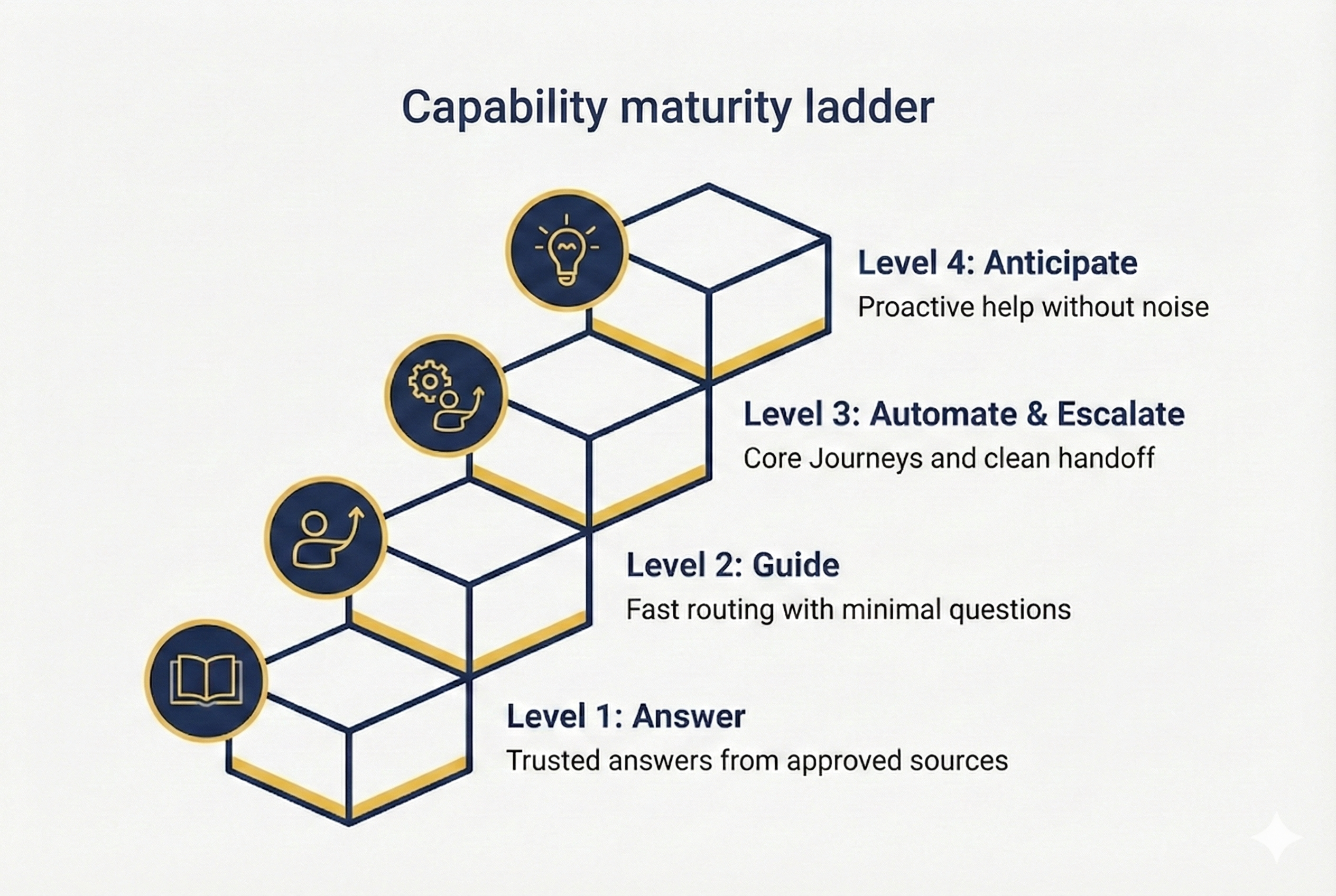
Level 1 Answer
Reliable knowledge retrieval and safe responses, with clear links back to sources.
Level 2 Guide
Confident triage and routing through short journeys, so users reach the right path without knowing the taxonomy.
Level 3 Automate and Escalate
A small number of Core Journeys run end to end, with governed actions and clean human handoff when needed.
Level 4 Anticipate
Proactive messaging that reduces repeat contacts without creating noise, driven by trusted signals and context and relevance controls.
A practical next step
If you want a structured way to move from ideas to a credible pilot, the Intent First Virtual Agent Assessment gives you two entry paths. Both use the same capability lens from this article. The difference is whether you are starting fresh, or fixing what already exists.
Intent Snapshot, Start track
For organisations starting out, or still stuck in portal and email.
What it gives you
• A ranked view of your top intents and where friction sits today
• Your first three Core Journeys, chosen by volume and friction
• A readiness view across knowledge, permissions, catalogue, workflows, and handoff
• Build ready conversation blueprints for each Core Journey, including off ramps and required data
• A lightweight pilot scoreboard and a 30 60 90 plan
VA Health Check, Improve track
For organisations that already have a virtual agent, but it is underused, annoying, or stale.
What it gives you
• A capability score across the five layers, so you can see exactly what is weak
• What is rotting across knowledge, conversation design, automation, escalation handoff, and measurement
• A practical governance loop so the agent stays fresh after the relaunch
• A prioritised improvement roadmap that fixes trust first, then expands capability
Either way, the goal is the same. Make a small number of Core Journeys feel effortless, then expand from evidence.