
Most organisations I work with still have an email-heavy ITSM experience:
ServiceNow drives the work
Outlook carries most of the notifications
Teams is where people actually sit during the day
On paper the answer sounds obvious: “Move more of the ServiceNow experience into Teams.”
In practice, the real question is: How do we shift towards a Teams-first experience without creating more noise or another big project?
This article gives you a simple roadmap. It is written for delivery managers, platform owners and IT leaders who want to move in this direction but need a sensible place to start.
In most environments, that roadmap includes a small Virtual Agent footprint in Teams, even a light configuration. You do not need every catalogue item in chat. A handful of “how do I” topics and simple ticket actions is often enough.
What Teams first actually means
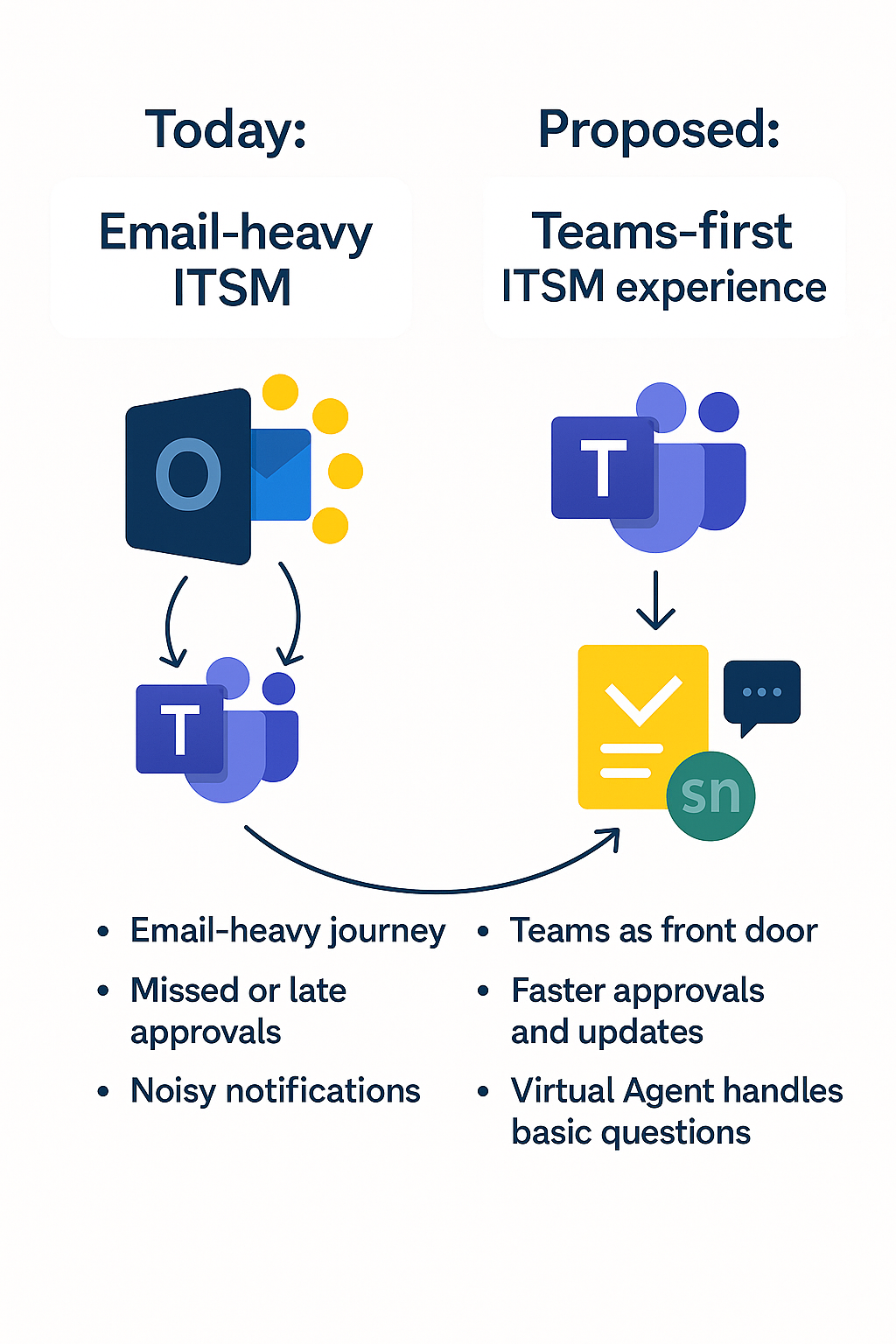
Teams first does not mean killing email or recreating your entire portal inside chat.
A Teams first ITSM experience usually looks like this:
• ServiceNow stays the system of record. All the data, history and governance still live there.
• Teams becomes the front door and decision surface. Approvals, urgent signals, simple requests and status updates appear where people already are.
• Email becomes more selective. Formal communications, executive updates and external parties still use Outlook.
The aim is not to move everything. It is to shorten the journey for the work that happens most often and matters most.
Step 1: Be clear about the problem
Before you switch anything on, write one simple sentence:
“We are doing this to reduce [this pain] for [this group], and we will know it worked when [this measure] improves.”
For example:
• Reduce approval delays for change managers by improving the average approval time.
• Reduce basic “how do I” tickets from end users by answering them through the Virtual Agent in Teams, improving time-to-answer and deflecting calls and emails.
• Reduce swivel chair work for service desk agents by handling approvals and clarifications via Teams-linked records, thereby increasing the number of tickets resolved per agent per day.
If you cannot fill that in, you are not ready for a Teams first approach. You will only spread the noise around.
Step 2: Pick one role and one journey
You do not need a massive design exercise. Start with:
• One role, for example, change approver, major incident manager or service desk agent
• One journey they repeat often, for example, approving changes, handling priority one incidents, updating tickets, asking customers for more detail, answering simple “how do I” questions
Look at how that journey works today:
• How many times do they bounce between Teams, Outlook and ServiceNow
• Where do they wait
• Where do things get missed or lost
Then design a cleaner version. For example:
• Change approvers action cards in Teams instead of trawling through email
• Major incident managers work from a defined Teams channel for each major incident, linked to the record
• Agents and customers exchange clarification questions in Teams while the record stays in ServiceNow
• End users ask simple “how do I” questions in Virtual Agent in Teams instead of emailing the service desk
Once this works for one role and one journey, you can expand deliberately.
Step 3: Move the right signals into Teams
The quickest way to fail is to move everything.
Instead, start with a small set of high-value signals.
Approvals
These include change approvals, access requests and simple service requests. They are time sensitive and often owned by people who live in Teams.
Urgent alerts and escalations
These include priority one or major incident notifications, service level breach warnings and key service outage updates. They belong in clearly defined Teams channels where the right people can see and act quickly.
Agent and requester updates
For example, “we need more information” or “can you confirm this is resolved”. As short messages in Teams, these move work along faster than long email threads.
All of this still writes back to ServiceNow. Teams is simply where people see and act on it.
Step 4: Decide what stays in Outlook
Teams first is not Teams only.
There are good reasons to keep some ServiceNow-related communication in email:
• Senior executives who genuinely live in Outlook
• Formal communication such as release notes, policy updates and scheduled maintenance
• External stakeholders who are not in your Teams environment
• Early stage Teams adoption, where email is still more reliable
A common pattern looks like this:
• Operational, time-sensitive signals go to Teams
• Formal, long form, and external communication go to Outlook
For example, you might still send formal change summaries or monthly service updates by email, but surface time sensitive events such as urgent access approvals, password reset approvals or account lockouts in Teams, where managers are more likely to see and act.
The key is to decide this on purpose, not to send everything everywhere.
Step 5: Pilot, measure and expand
Treat your first design as a pilot:
• One business unit or location
• One or two approval types
• One major incident pattern
• A handful of Virtual Agent light topics
Measure:
• Approval time before and after
• Time to first response on incidents or requests
• Resolution time and tickets bouncing between groups
• Virtual Agent adoption and resolution rates
• Feedback from people using the pattern in Teams
If it works, expand gradually. Add more roles, more journeys, better Virtual Agent topics and smarter notifications. If it does not work, fix the journey and the design before enabling more features.
A simple roadmap you can reuse
You can frame all of this as a short, reusable roadmap.
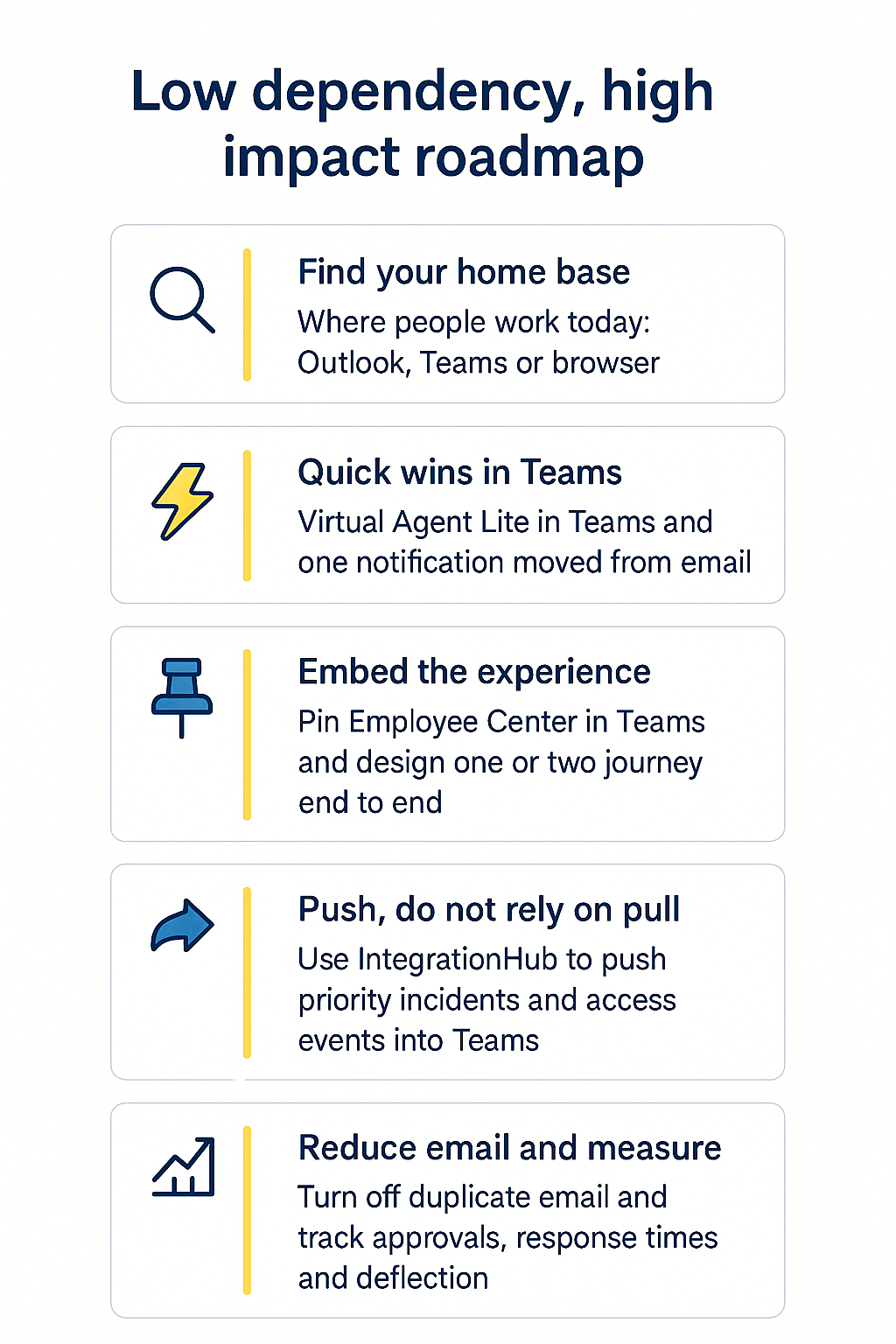
ServiceNow and Microsoft 365, a low dependency, high impact roadmap
Step 1: Find your home base
• Where do people really work today, Outlook, Teams or the browser
• Which two or three notification types create the most noise
Step 2: Quick wins in Teams or Outlook if that is truly dominant
• Turn on a light Virtual Agent footprint in Teams for a few high-volume “how do I” questions and simple ticket actions.
• Move one notification stream from email to Teams. Stop duplicating everything.
Step 3: Embed the experience
• Pin the Service Portal or Employee Center in Teams.
• Map a couple of journeys end to end, for example, request a laptop, password reset or access expiry, or raise a major incident war room.
Step 4: Push, do not rely on pull
• Use IntegrationHub to send targeted, actionable notifications such as service level breaches, priority one incidents and security or access expiry messages as cards in Teams.
Step 5: Reduce email and measure the experience
• Turn off overlapping emails where the Teams path is working.
• Measure approvals, response times, Virtual Agent deflection and tickets resolved per agent per day.
If you would like a structured version of this
I run the Microsoft 365 Experience & Integration Assessment, a focused review that maps how your people actually work across Outlook, Teams and ServiceNow, then designs a low dependency roadmap to reduce swivel chair behaviour, speed up approvals and make better use of Virtual Agent.
In a short engagement, we look at:
• Where different roles really spend their time in Teams, Outlook and the browser
• Which approvals, notifications and “how do I” questions are creating noise
• How a small Virtual Agent light footprint in Teams could deflect basic tickets
• A simple, staged roadmap you can act on within a quarter
The aim is not to turn everything on. It is to choose a sensible starting point that fits the way your organisation actually works today.