
Almost every organisation I work with already has two major systems in place:
• ServiceNow running core workflows
• Microsoft Teams running daily communication.
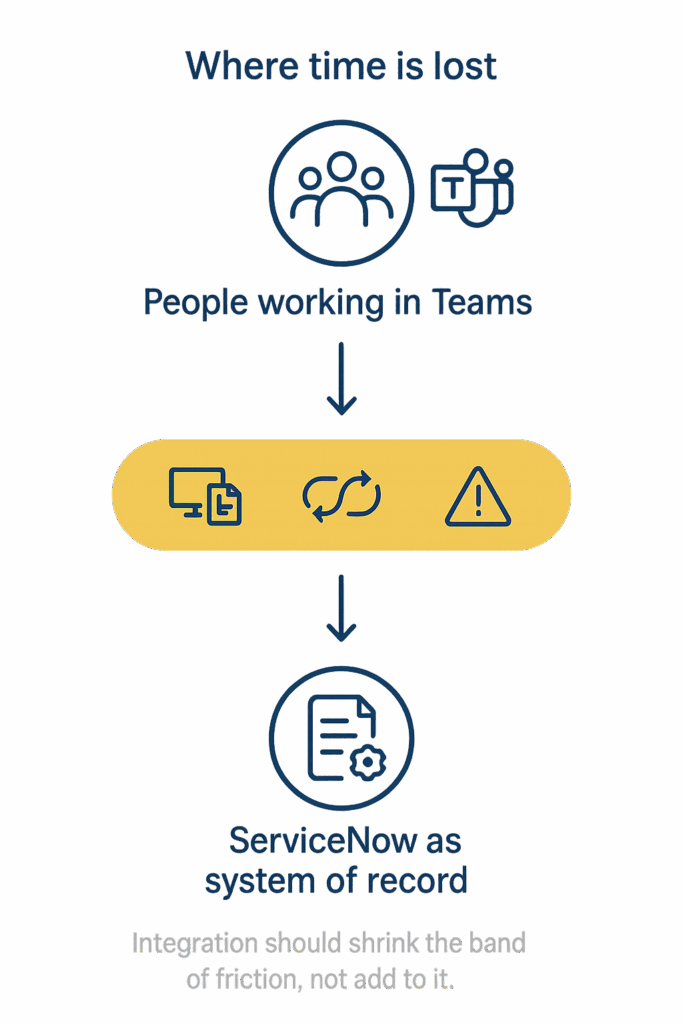
The conversation usually begins with the same question: “How do we connect ServiceNow to Teams?”
The better questions are much simpler:
• Should we integrate at all, and what problem is it meant to solve?
• Where would integration remove friction, and where would it simply add more noise?
The real problem is in the gaps between tools
A few data points explain the pain.
• Teams has more than three hundred million users.
• Knowledge workers spend about one-fifth of their time searching for information.
• Context switching can reduce productive time by up to forty per cent.
• ServiceNow calls this swivel chair work, the constant back and forth between systems just to finish something simple.
All of these points lead to one truth: The waste lives in the gaps between ServiceNow and Teams.
So, before you turn anything on, ask one practical test: Does this integration shorten the user’s journey, or does it create another click?
If the journey becomes shorter, explore it.
If not, leave it for now.
Three reasons not to integrate yet
There are times when integrating will only make a situation worse.
1. You cannot state the problem clearly
If you cannot answer this sentence, you are not ready.
“We are doing this to reduce [this pain] for [this group], and we will know it worked when [this measure] improves.”
If you cannot define it simply, wait.
2. The process inside ServiceNow is still messy
If forms, routing or SLAs are inconsistent, integration will only spread that inconsistency to more places.
Fix the basics first, then surface the journey into Teams once it is stable.
3. Notifications are already ignored
If people mute channels and delete ServiceNow emails, adding more alerts will not help.
Decide which events deserve attention and who truly needs to see them before sending anything to Teams.
Who does what: ServiceNow and Teams
Once you choose to explore integration, keep roles simple.
• ServiceNow is your workflow engine and your system of record. It holds incidents, requests, approvals and audit history, usually in the browser.
• Outlook still has a place for more formal or external communication.
• Teams is where people spend their day. It is where conversations happen and decisions are made.
Integration should close the distance between the place where work is recorded and the place where people actually sit.
What the ServiceNow and Teams integration gives you
ServiceNow for Microsoft Teams provides a handful of useful capabilities.
• People can chat with the Virtual Agent inside Teams for common IT or HR questions.
• Users can open ServiceNow inside Teams as an app or tab.
• Notifications can appear inside Teams. Some are informational, such as a status update. Others are actionable, such as an approve or reject button or a prompt to open a record.
This is not a feature tour.
The real task is to decide where these capabilities remove friction.
Common reasons to integrate are simple.
• Faster approvals
• Better coordination during major incidents
• Higher use of tickets
• Easier ways to comment or respond to updates
• Clear signals that people will actually see
• A simple way to create a ticket from Teams
Once you know which of these matter most, the design becomes much easier.
What a Teams first approach actually looks like
For many organisations, a Teams first approach works well for high frequency work.
This is especially true when people spend more time in Teams than in a browser, when incident conversation already happens in Teams, and when managers look at Teams alerts before they look at email.
Three patterns cover most real world use cases.
1. Approvals and alerts appear where people already look
If a manager spends their day in Teams, they should be able to approve a change or request without chasing a link.
If there is a P1 or an SLA breach, the message should appear in the correct Teams channel, not inside a distribution list that nobody checks.
Users should see important updates in their Teams chat with the ServiceNow app.
The work still lives in ServiceNow. Teams is simply where the quick decision happens.
2. Simple actions inside chat
People should be able to raise a basic ticket, check progress or add a screenshot from inside Teams.
This avoids forcing users to remember links or switch tools for simple tasks.
Virtual Agent or Now Assist can help, but even a small set of basic flows can remove a lot of repetitive questions.
3. Incidents and conversations stay linked
Most major incidents already unfold inside Teams.
The risk is that decisions and evidence never make it back into the incident record.
A good integration lets you start a Teams war room from the incident and capture key details back into ServiceNow.
It also lets agents begin a Teams chat from a ticket and bring important messages into the record.
Teams is where people talk.
ServiceNow is where the story is kept.
Where to start without a large project
You do not need a long program to begin.
• Pick one role, such as an IT manager or a service desk agent.
• Pick one journey they do often, such as approving a change or responding to an incident.
• Count the number of times they hop between Teams, email and ServiceNow.
If the number makes you wince, you have found a good candidate.
Clean up that journey inside ServiceNow, then integrate only that flow into Teams with a clear outcome in mind.
This approach always works better than switching everything on and hoping for the best.
If you are unsure where ServiceNow and Teams integration will genuinely help, or where it might simply add more noise, I walk through this in the Microsoft 365 Experience & Integration Assessment, which looks at how Outlook, Teams, and the service portal appear in your environment.
The focus is always the same: reduce friction, support the way people actually work, and make sure any integration meets the moment your organisation is in. There is never one perfect pattern. The key is choosing the right starting point for your stage of maturity.